

Instantly resize your images to 1200 × 1800 pixels without manually calculating dimensions. Whether you're preparing product photos, digital artwork, printable graphics, posters, or portfolio images, the tool generates accurate pixel dimensions in just a few clicks. It helps create consistent image sizes while saving time and reducing editing effort.
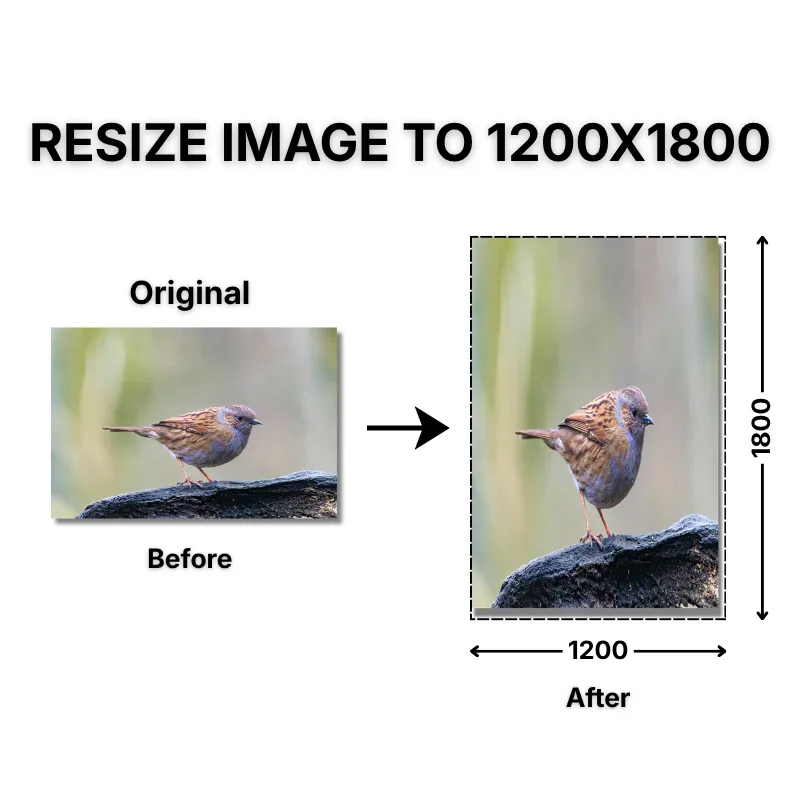
Every image is different, which is why the tool offers multiple resize modes. Select Stretch for exact pixel dimensions, Crop Fit to fill the frame while preserving proportions, or Fixed to keep the complete image visible with optional background padding. These options help you achieve the appearance that best matches your project.
Customize both the DPI and image quality before downloading. Lower DPI values are suitable for websites, presentations, and digital sharing, while higher values such as 300 DPI provide sharper printed output. You can also balance visual quality and file size by adjusting the image quality settings to suit your project.
Although this page focuses on 1200 × 1800 pixels, the resize tool also supports pixels, centimeters, millimeters, and inches. This allows you to switch between different measurement units without using separate conversion tools, making it easier to prepare images for both digital and print projects.
Make quick adjustments without opening additional editing software. Rotate sideways photos, flip images horizontally or vertically, zoom into important areas, crop unwanted sections, or change the image shape before downloading the resized file.
After resizing, download your image in JPG, JPEG, PNG, WEBP, or GIF. Whether you're creating web graphics, printable artwork, digital portfolios, or product images, choosing the right format helps ensure better compatibility and image quality.
Other useful information
Explore our visual guides and infographics
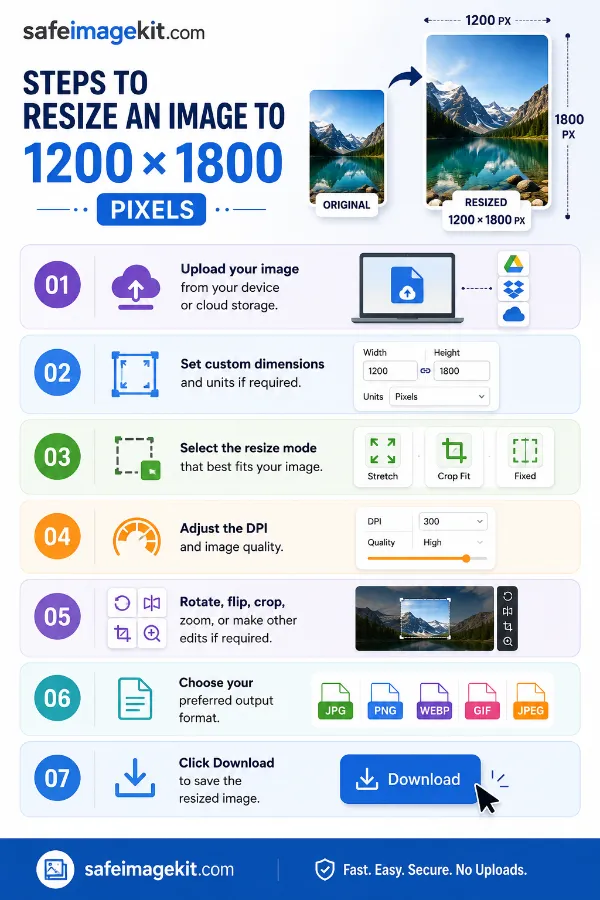
The infographic shows how to resize an image to 1200×1800 pixels.
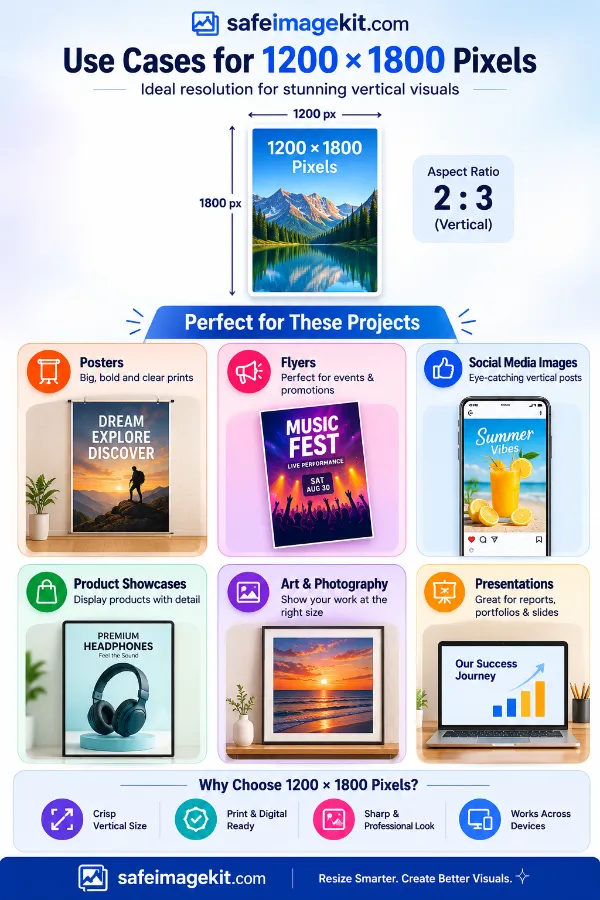
The infographic showcases common applications for 1200×1800 pixel images, such as portrait prints, posters, digital displays, and other vertical layouts.
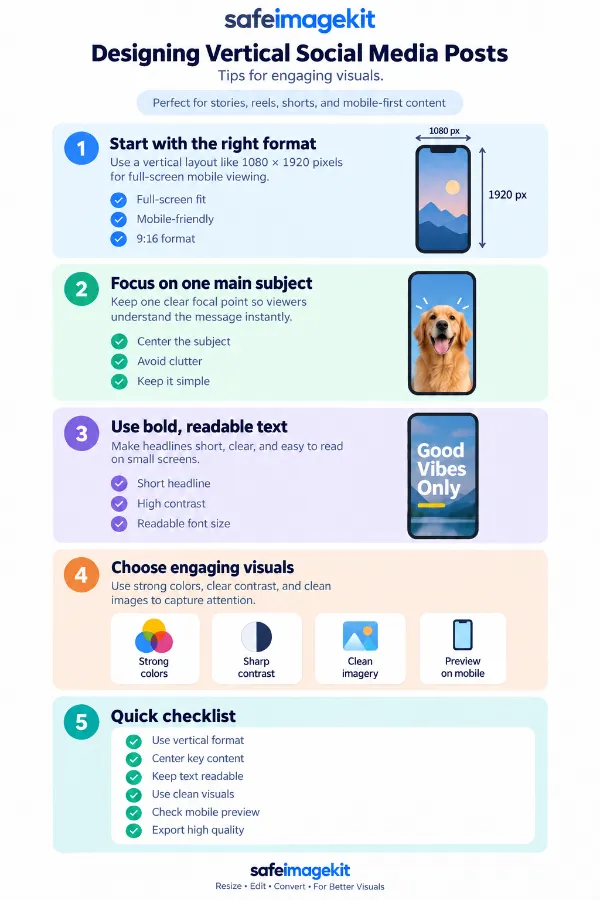
The infographic shares practical design tips for creating vertical 1200 × 1800 pixel social media posts.
Frequently Asked Questions
A 1200 × 1800 pixel image has a width of 1200 pixels and a height of 1800 pixels, creating a 2:3 aspect ratio. This portrait-oriented resolution is commonly used for digital artwork, product images, posters, printable graphics, and photography where consistent proportions are important.
Upload your image, choose the resize mode that best suits your image, adjust the DPI or image quality if required, and download the resized image. You can also rotate, flip, crop, or zoom before saving. Furthermore, you can enter custom dimensions and units.
Yes. Reducing an image to 1200 × 1800 pixels generally maintains good quality. Enlarging a small image may reduce sharpness because additional pixels must be generated. Using a high-resolution source image helps produce the best results.
Yes. Resizing usually changes the file size because the image dimensions are modified. The selected image quality, DPI, and output format also affect the final file size.
Choose Stretch when exact dimensions are required; Crop Fit to maintain the aspect ratio while filling the frame; or Fixed to keep the complete image visible with optional background padding.
Yes. Although 1200 × 1800 pixels is primarily a portrait-oriented resolution, you can resize both portrait and landscape images. Depending on the resize mode you choose, the image can be stretched, cropped to fill the frame, or fitted with background padding while maintaining the original composition.
Yes. The tool works on smartphones, tablets, laptops, and desktop computers without requiring software installation.
Yes. You can resize images to 1200 × 1800 pixels for free without creating an account or installing software.
Yes. Your uploaded images are processed securely for resizing and are not sold or shared with third parties. Since no account is required, you can resize your images quickly while maintaining your privacy.
This resolution is commonly used for portrait photographs, digital artwork, posters, product listings, printable graphics, social media designs, book covers, and print-on-demand products that use a 2:3 aspect ratio.
Yes, but the final print size depends on the selected DPI. For example, at 300 DPI, a 1200 × 1800 pixel image prints at approximately 4 × 6 inches, while lower DPI values produce larger prints with reduced sharpness. Selecting the appropriate DPI ensures the best balance between print size and image quality.
Many websites, digital marketplaces, design templates, online forms, and printing services require images with specific pixel dimensions. Resizing your image to 1200 × 1800 pixels ensures it meets those requirements, improves consistency across projects, and helps avoid unexpected stretching, cropping, or upload errors.
The ideal DPI depends on your project. 72 DPI – Digital viewing 96 DPI – Screens and presentations 150 DPI – Draft printing 300 DPI – High-quality printing
It depends on the resize mode you choose. Crop Fit and Fixed preserve the original aspect ratio, while Stretch resizes the image to the exact dimensions.
Yes, but enlarging a low-resolution image may reduce sharpness or introduce pixelation. Starting with a high-quality image produces better results.
Yes. 1200 × 1800 pixels works well for digital posters, promotional graphics, artwork previews, and portrait-oriented designs. For large printed posters, using a higher DPI or larger source image is recommended.
Yes. You can resize images to 1200 × 1800 pixels for compatible print-on-demand products, digital artwork, and custom printing projects that require a 2:3 aspect ratio.
Yes. This portrait resolution is suitable for many online product catalogs, portfolios, and digital marketplaces where consistent image dimensions improve presentation.
Portraits, photos, artwork, illustrations, book covers, product images, and promotional graphics all work well at 1200 × 1800 pixels because the portrait orientation emphasizes vertical compositions.
If your image contains unwanted borders or extra background, use our Image Cropper before resizing it to 1200 × 1800 pixels.
If you need to resize several images at once, use our Multi-Image Resizer to process multiple files efficiently.
Yes. Many websites, e-commerce platforms, online portfolios, and content management systems display images more consistently when they use uniform dimensions. Resizing your images to 1200 × 1800 pixels helps create a professional appearance while reducing layout inconsistencies across different devices.
Over 500k Users Rely on Our Image Editing Tools Monthly
Join a growing community of creators who trust safeimagekit.com for versatile image editing and processing solutions.